Last updated: August 16, 2026
Pick the right local model before you spend $1,200 on a GPU upgrade — and know exactly when the Opus API bill is still worth it. That’s the only question that matters in 2026. The “best coding LLM” leaderboard has been answered a dozen times this year on YouTube and Twitter, and the answers are all correct in their narrow way. What nobody is ranking is the decision you actually have to make: which model fits the workflow, the hardware budget, and the failure modes you can live with. Alex Ellis, founder of a self-hosted AI shop, cut through the noise in his June write-up with a line that should reframe the whole debate: “Local Qwen isn’t a worse Opus, it’s a different tool.” He’s right, and the rest of this post is the decision tree that follows from that.
Three models earn a serious look for builders in mid-2026: Claude Opus 4.8 as the closed-API frontier, GLM-5.2 as the open-source heavyweight, and Qwen 3.6 27B as the consumer-GPU workhorse. They aren’t substitutes. They live in different parts of the cost-vs-capability curve, and picking the wrong one costs you either money, time, or both.
The Three Models at a Glance
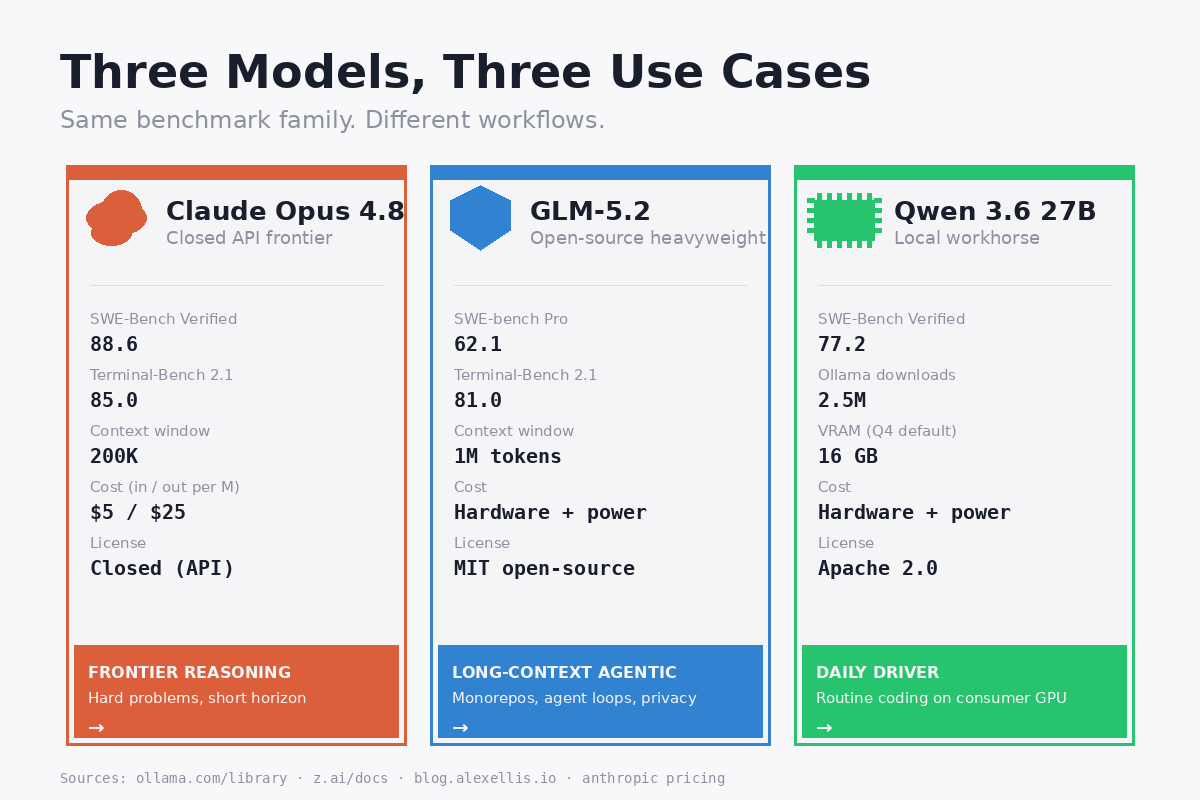
Before we get into the benchmarks, here are the three on the same axes. Every number is source-linked in the section that follows.
| Model | SWE-Bench Verified | SWE-bench Pro | Terminal-Bench 2.1 | License | API cost (in/out per M) |
|---|---|---|---|---|---|
| Claude Opus 4.8 | 88.6 | — | 85.0 | Closed (API only) | $5 / $25 (Fast Mode 2x) |
| GLM-5.2 | not measured | 62.1 | 81.0 | MIT open-source | hardware + electricity |
| Qwen 3.6 27B | 77.2 | — | — | Apache 2.0 | hardware + electricity |
Three things to notice before you read further: Opus still wins on raw coding benchmark, GLM-5.2’s killer feature is its 1M-token context window on a permissive open license, and Qwen 3.6 27B is the only one of the three that will actually fit on a single high-end consumer GPU. Those are the axes the benchmarks don’t show you.
Benchmark Reality Check
SWE-Bench Verified is the closest thing the coding-LLM world has to a real-world test, and on the latest published numbers Alex Ellis ran head-to-head with both models: Opus 4.8 scored 88.6, Qwen 3.6 27B scored 77.2. That’s an 11-point gap, and on paper it should be the end of the conversation.
It’s not. Look at Terminal-Bench 2.1, which measures long-horizon agentic coding tasks: Opus 4.8 hit 85.0 and GLM-5.2 hit 81.0, per the GLM-5.2 model card on Ollama. That four-point gap disappears in real agentic workloads where context length, tool use stability, and license terms dominate the calculus. On FrontierSWE, the open-source leaderboard on long-horizon coding, GLM-5.2 trails Opus 4.8 by 1% — within the noise floor of any given run. That’s not “almost as good.” That’s a statistical tie.
Qwen 3.6 27B’s official model card on Ollama advertises “substantial upgrades in agentic coding” over Qwen 3.5 and 2.5 million downloads, which puts it in rare air for an open-weight model. The headline 77.2 SWE-Bench Verified number is from a real founder running real production workflows, not a vendor blog. That’s the number that earned Qwen 3.6 the “different tool, not a worse Opus” framing.
The honest read of the benchmark landscape: Opus 4.8 is still the frontier on raw coding, GLM-5.2 is the best open-weight option for long-context agentic work, and Qwen 3.6 27B is the strongest mid-size local model that runs on hardware you already own.
The Cost Story — Cloud vs Local
This is where the “different tool” framing earns its keep. Morph’s API pricing snapshot from June 9, 2026 puts Opus 4.8 at $5 input / $25 output per million tokens on standard mode and $10 / $50 on Fast Mode. pricepertoken’s corroborating entry matches. Heavy agentic usage — the kind where your local model is in a tool-use loop chewing through thousands of tokens per task — burns through a $200/month subscription in days, not weeks.
Local hardware is a one-time hit. An RTX 6000 Pro (or a used workstation card with 48GB of VRAM) runs roughly $7,000 new or $1,200 used on the secondary market as of mid-2026, and it will run Qwen 3.6 27B at full precision with room to spare. GLM-5.2 is a different animal entirely: 753B parameters means even a Q4 quantization needs roughly 400GB of VRAM — think multi-GPU rigs or a Mac Studio cluster, not a single workstation card. At residential electricity rates and a typical 6-hour-daily agent workload, you’re looking at $15—30/month in power. The breakeven math is brutally simple: at $200/month of Opus API spend, a used workstation card pays for itself in six months. At $400/month — which is realistic if you’re running a non-trivial agent fleet — it pays for itself in three.
The cost story isn’t just the GPU. It’s the freedom to run a model against your private codebase without uploading it to a third party, the absence of rate limits at 2am, and the ability to fine-tune on your own data. Those are the things the API pricing page doesn’t show.
For builders who already have a local LLM rig and want to wire it into a proper tool-using agent, the Run Your Own AI beginner’s guide covers the full setup. The MCP explainer is what you’ll want next, because the moment you wire a local model into MCP tool servers, you’ve got a sovereign coding agent that costs pennies per task.
When to Use Each
The decision tree, in order of how often each path comes up in real workflows:
- Frontier reasoning, short horizon — Opus 4.8 API. Hard architectural decisions, tricky refactors on unfamiliar codebases, security audits. The 11-point SWE-Bench gap is real here and you feel it on the first hard problem.
- Long context, agentic loops, open-source license — GLM-5.2 local. Repos that don’t fit in a 200K window, code you can’t legally upload to a third party, agent swarms where you’re burning millions of tokens per day. The 1M context and MIT license are the moat.
- Daily driver on consumer hardware — Qwen 3.6 27B local. Routine coding tasks, autocomplete-on-steroids, refactors, test writing, documentation. The model that pays for itself the fastest and runs on a GPU you may already own.
- Browser agents and tool-using workflows — local first, Opus for the hard tail. Route 80% of agent traffic through Qwen 3.6 27B for cost, fall back to Opus 4.8 for the 20% of tasks where the local model loops. The browser-agent security playbook walks through the routing pattern.
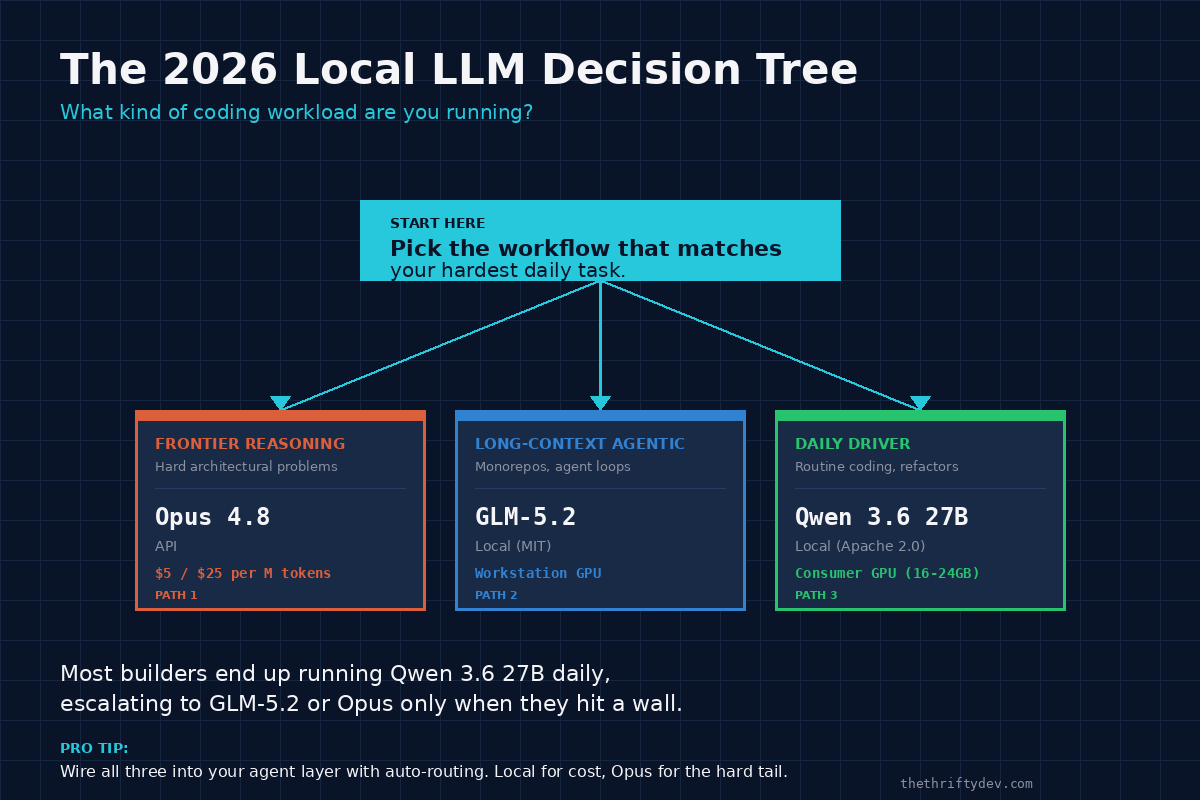
Most builders I’ve seen end up running #3 daily, dipping into #2 for big repos, and reserving #1 for the week they hit a wall they can’t crack locally. That’s the cost-optimized stack and it’s also the most resilient — no single provider outage takes you offline.
The Hallucination Tax
Here’s the part nobody puts in the marketing copy. Alex Ellis, the same founder whose numbers we’re quoting above, flagged it directly: running Qwen 3.6 27B in production carries a real risk of infinite loops and hallucination, especially when you quantize down to fit consumer GPUs. The model doesn’t degrade gracefully. It degrades in ways that look correct for the first three turns and then quietly invent a function signature, a file path, or a whole API surface that doesn’t exist.
This is the “hallucination tax” — the human-time cost of reviewing every line of code a local model produces, because the alternative is shipping an agent that confidently breaks your build at 3am. It is real, it is significant, and it is the single biggest reason to keep an Opus API escape hatch in your stack even after you’ve gone 80% local.
GLM-5.2 is less prone to the infinite-loop failure mode in Alex’s testing — its bigger context and longer training run make it more stable on multi-turn agentic flows — but the same caveat applies at lower quantizations. Q4-quantized GLM-5.2 will hallucinate more than full-precision. The trade is hardware cost vs. reliability, and there’s no free lunch on it.
The honest operational pattern: run local for cost and throughput, but never deploy a local-only agent into a path where hallucination is catastrophic. Read-only file operations, doc generation, test scaffolding — all fine. Autonomous pushes to main on production infra — not yet, not without a human in the loop. The Opus API is the safety net for the moments when “close enough” from a local model is genuinely not enough.
How to Try Them Yourself
If you’ve got an Ollama install already (and if you don’t, the Run Your Own AI guide walks you through it), you can have Qwen 3.6 27B running in under five minutes:
ollama pull qwen3.6:27b
ollama run qwen3.6:27b
Hardware floor depends on quantization. Q4 fits on a 16GB card, fp16 wants 48GB+, and most Ollama defaults sit somewhere in between — pick the quant that matches your GPU and accept the hallucination tax tradeoff noted earlier. GLM-5.2 is a bigger lift:
ollama pull glm-5.2
ollama run glm-5.2
Full-precision GLM-5.2 needs 48GB+ of VRAM, which is single-GPU workstation territory (RTX 6000 Pro, A6000, or a Mac Studio with the M3 Ultra). Quantized to Q4, you can squeeze it onto a 24GB card but you’ll feel it on long-context prompts. Per the official Z.ai documentation, the model is tuned for tool use and long-context retrieval — it’s worth the hardware if your workload actually needs either. Check the model’s quant options on the Ollama model page before you commit to a card.
For Opus 4.8, there’s no local install — it’s API-only. Anthropic’s standard tier is the cheapest path; Fast Mode (2x cost) is the one you reach for when you need a sub-second first-token latency on a tight agent loop:
curl https://api.anthropic.com/v1/messages \
  -H "x-api-key: $ANTHROPIC_API_KEY" \
  -H "anthropic-version: 2026-01-01" \
  -H "content-type: application/json" \
  -d '{"model": "claude-opus-4.8", "max_tokens": 1024, "messages": [{"role": "user", "content": "Hello"}]}'
That’s the whole test surface. Pull both local models, hit the API once for comparison, and run the same three coding tasks through all three. The benchmark numbers tell you what’s possible; your own workload tells you what’s actually worth paying for.
The Stack I’d Recommend
Start with Qwen 3.6 27B. It runs on hardware you can buy used for under $1,200, it scores 77.2 on SWE-Bench Verified in real production testing, and it has 2.5 million downloads on Ollama — meaning you’re not on the bleeding edge when something breaks. Build your daily-driver agent loop around it, get a feel for the hallucination tax on your actual workload, and budget for the GPU upgrade only if you find yourself constantly hitting the context-length wall.
Graduate to GLM-5.2 the day you hit a real long-context workload — a monorepo that won’t fit in 128K, a code-review agent that needs to read the entire history of a 200-file refactor, a RAG pipeline where the chunks keep spilling out of your model’s window. The MIT license and the 1M context are the killer features, and they earn their hardware cost.
Keep Opus 4.8 as the escape hatch and the frontier-reasoning tool. Don’t try to replace it locally — the 11-point SWE-Bench gap is real and the $200/month safety net is cheap insurance against the moments where a local model is confidently wrong. Wire the routing in your agent layer so that hard problems escalate automatically, and you’ll spend less on Opus than you feared while keeping the quality ceiling where it needs to be.
The full local-LLM setup, including MCP wiring and the agent-routing pattern that ties all three together, is in the Run Your Own AI guide. Pick the right model first, then spend the GPU money — not the other way around.
Primary Sources
- Ollama — GLM-5.2 model card
- Ollama — Qwen 3.6 model card
- Alex Ellis — Local Qwen isn’t a worse Opus, it’s a different tool
- Z.ai — GLM-5.2 official documentation
- Morph (Jun 9, 2026) — LLM API pricing snapshot
- pricepertoken — Anthropic Claude Opus 4.8 pricing
Read next
Flock Cams, Surveillance Drones, and the Civil Disobedience Field Manual
22 min read·Updated Aug 15, 2026NostrXFacebookRedditTelegramSMSCopyOn this page▾What Has Been BuiltFlock Safety: The Private Company Running a National PanopticonThe HardwareThe ICE PipelineThe…
OpenClaw as an Agentic Framework: How I Use It, Why It Matters, and What to Consider Before You Set It Up
A practical builder guide to OpenClaw: setup, channels, memory, heartbeats, cron jobs, multi-agent workflows, sandboxing, and why an always-on agentic framework changes…
Age Verification Creep Tracker: KOSA, App Store ID Laws, and the Fight for Anonymous Speech
A living tracker for KOSA, app store age verification, state ID-check laws, and the policy pipeline pushing the internet toward identity checkpoints.